
Introduction
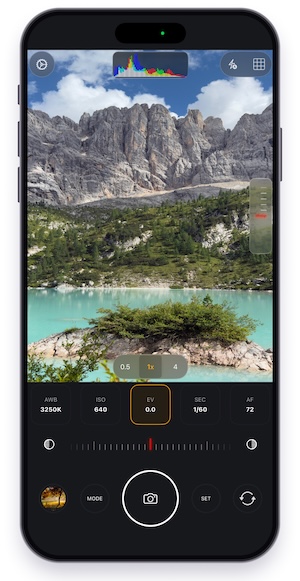 Welcome to CameraPixels, a manual camera app built for people who want full control over how their images are made. Whether you are shooting a quick portrait, bracketing exposures for a high-contrast scene, or sweeping focus across a macro subject, CameraPixels puts every important setting under your fingers and keeps the interface out of your way.
This guide explains what CameraPixels can do and how to get the most from each feature. It is written for photographers of all levels: if you are new to manual controls, each chapter explains the concepts as well as the steps; if you are experienced, you can jump straight to the feature you need.
What you can do with CameraPixels
Capture modes
- Photo: Standard still capture with all the manual and semi-manual controls available.
- Burst: Capture a rapid sequence of frames so you never miss the decisive moment.
- Portrait: Shoot portraits with subject-focused depth effects.
- Video and Time-lapse: Record video, or compress long events such as sunsets, clouds, and city traffic into short time-lapse clips.
Bracketing
- Exposure bracketing: Capture a series of frames at different exposures so you have the right frame for highlights and shadows in high-contrast scenes. With fully manual exposure bracket - set each exposure in the bracket independently, giving you complete control over every frame in the sequence.
- Focus bracketing: Capture a series of frames at different focus distances, ideal for macro, product, and landscape work where a single focus point isn’t enough.
- Hybrid bracketing: Combine exposure and focus bracketing in a single capture sequence.
Exposure control
- Fully manual exposure: Set every exposure parameter yourself.
- Semi-manual exposure: Fix the parameters that matter to you and let the app handle the rest.
Workflow and convenience
- Presets: Save your favorite combinations of settings and recall them in one tap, so you can switch between, say, a night-sky setup and a daylight street setup instantly.
- Lightbox: Review your captures in the app's own local folder, keeping your work separate from the rest of your photo library until you decide what to keep.
- Lock Screen extension: Launch CameraPixels straight from your Lock Screen when a moment appears.
- Camera Control extension: Open and use CameraPixels with the device's Camera Control, for fast, tactile access.
How this guide is organised
The chapters that follow walk you through CameraPixels step by step:
- Getting started: The interface and basic setup.
- Capture modes: Photo, Burst, Portrait, Video, and Time-lapse.
- Exposure controls: Fully manual and semi-manual exposure.
- Bracketing: Exposure, focus, hybrid, and fully manual exposure brackets.
- Presets: Creating, saving, and managing presets.
- Lightbox: Reviewing and managing your captures.
- Quick access: Lock Screen and Camera Control extensions.
You do not need to read the guide in order. Each chapter is self-contained and refers to related chapters where it helps.
